
Data Protection & Privacy
🎯 Key Takeaways & Definition
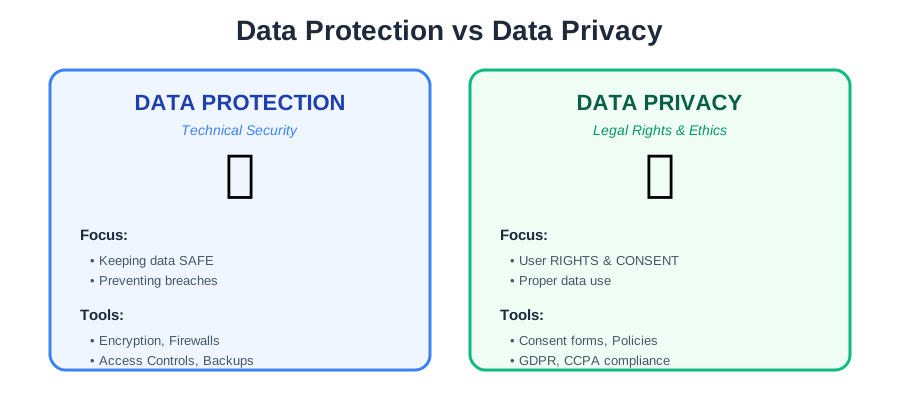
Data Protection: The technical mechanisms (tools/policies) used to secure data from unauthorized access, corruption, or loss.
Data Privacy: The legal and ethical right of an individual to control how their personal information is collected, used, and shared.
Core Concept: Protection is about security (keeping the data safe). Privacy is about rights (using the data responsibly).
The Rule: You can have Data Protection without Privacy, but you cannot have Privacy without Data Protection.
1. Definition of Data Protection
Data protection is the process of safeguarding information from compromise, corruption, or loss. It focuses on the Integrity and Availability of data.
It answers the question: "Is the data safe from hackers and disasters?"
Key Focus Areas:
- • Confidentiality: Prevent unauthorized access
- • Integrity: Prevent unauthorized modification
- • Availability: Ensure data accessible when needed (CIA Triad)
Technical Measures:
- • Encryption
- • Access controls
- • Backups
- • Firewalls
- • Intrusion detection
2. Definition of Data Privacy
Data privacy (or Information Privacy) is concerned with the proper handling of data according to laws and user consent. It focuses on the Confidentiality and Rights of the user.
It answers the question: "Are we authorized to collect this data, and are we using it for the agreed purpose?"
Key Focus Areas:
- • User consent: Did user agree to collection?
- • Purpose limitation: Using data only for stated purpose
- • User rights: Access, deletion, portability
- • Transparency: Clear privacy policies
Legal Framework:
- • GDPR (Europe)
- • CCPA (California)
- • HIPAA (Healthcare)
- • DPDP (India)
3. Principles of Data Protection
To secure data effectively, organizations follow these core principles:
Purpose Limitation 🎯
Principle: Collect data only for a specific, stated purpose.
Example:
- ✅ Good: "We collect your shipping address to deliver your order."
- ⌠Bad: "We collect your shipping address" (then sell it to marketing companies without telling you)
GDPR Article 5(1)(b): Data must be "collected for specified, explicit and legitimate purposes."
Data Minimization 📉
Principle: Collect only the bare minimum amount of data needed.
Example:
- ✅ Good: Email newsletter signup requires only email address
- ⌠Bad: Email newsletter signup requires: email, phone, address, date of birth, income level
Why It Matters:
- • Less data = smaller target for hackers
- • Less regulatory risk
- • Less storage cost
- • Builds user trust
Statistics:
- • 60% of companies collect more data than necessary
- • Data minimization reduces breach cost by average $1M (IBM 2025)
Storage Limitation ⏳
Principle: Do not keep data longer than necessary. Delete it when the job is done.
Example:
- ✅ Good: Delete credit card details after order shipped (unless user saves for future)
- ⌠Bad: Keep all customer data forever "just in case"
GDPR Requirements:
- • Define retention periods
- • Automated deletion processes
- • Regular data audits
Practical Application:
User data lifecycle:
1. Collect → 2. Use → 3. Store (limited time) → 4. Delete

Example: E-commerce order
- Order data: Keep 7 years (tax/legal requirements)
- Browsing history: Delete after 90 days
- Marketing consent: Re-confirm annually, delete if no response
Accuracy ✅
Principle: Ensure the data is correct and up to date.
Why It Matters:
- • Inaccurate data leads to wrong decisions
- • Old addresses = failed deliveries
- • Wrong medical records = patient harm
Implementation:
- • Allow users to update their information
- • Regular data quality audits
- • Verify critical data (email confirmation)
4. Data Privacy Threats
What happens when privacy is violated?
Identity Theft 🎭
Threat: Attackers use stolen PII (Personally Identifiable Information) like SSNs or Birth Dates to impersonate victims and open credit lines.
How It Works:
1. Hacker steals database (SSN, DOB, address)
2. Uses info to apply for credit card in victim's name
3. Maxes out card, disappears
4. Victim discovers ruined credit score months later
Impact:
- • Average cost to victim: $1,551 (2025)
- • Time to resolve: 6+ months
- • Credit score damage: 100+ points
Prevention:
- ✅ Encrypt PII at rest and in transit
- ✅ Access controls (least privilege)
- ✅ Credit monitoring services
- ✅ Two-factor authentication
Data Mining & Profiling 📊
Threat: Companies aggregating user data to create invasive behavioral profiles (e.g., predicting health issues before you know them).
Example: Target Pregnancy Prediction (2012):
- • Retailer tracked purchase patterns
- • Identified pregnancy based on buying habits (unscented lotion, vitamins)
- • Sent pregnancy ads to teenage girl
- • Her father discovered pregnancy from ads before she told him
Modern Examples:
- • Social media: Predicting political views, mental health issues
- • Health apps: Selling data to insurance companies
- • Shopping apps: Dynamic pricing based on profiling (charge more to wealthy users)
Privacy Concerns:
- • No transparency (users don't know what's inferred)
- • Discrimination potential (deny insurance, jobs)
- • Manipulation (targeted fake news)
Unauthorized Surveillance ðŸ‘️
Threat: Governments or corporations tracking user location and activity without consent.
Types:
1. Government Surveillance:
- • NSA mass data collection (Snowden revelations 2013)
- • China Social Credit System
- • Internet censorship and monitoring
2. Corporate Surveillance:
- • Apps tracking location 24/7 (even when not in use)
- • Smart devices: Alexa/Google Home recording conversations
- • Workplace monitoring: Keystroke logging, screen recording
3. Third-Party Tracking:
- • Cookies: Follow you across websites
- • Data brokers: Aggregate data from 100+ sources, sell profiles
- • ISPs: Track browsing history
Legal Protections:
- • GDPR: Requires explicit consent for tracking
- • CCPA: Right to opt-out of data sale
- • HIPAA: Restricts medical data sharing
5. Data Protection Techniques
These are the technical controls used to enforce privacy policies.
A. Encryption ðŸ”
Definition:
Converting plaintext into ciphertext so it is unreadable without a key.
Use Case:
Encrypting hard drives (BitLocker, FileVault) and database columns.
Types:
At Rest:
Database: customer_credit_cards
Before encryption: 1234-5678-9012-3456
After encryption: Xy7#k9@mZ2pQ... (AES-256)
In Transit:
User → TLS/SSL → Server
Encrypted channel prevents eavesdropping
Best Practices:
- ✅ Use strong algorithms (AES-256, RSA-4096)
- ✅ Secure key management (HSM, KMS)
- ✅ Encrypt backups
- ✅ Full-disk encryption for laptops
B. Access Control 🚪
Definition:
Restricting who can view or edit data.
Mechanism:
Using ACLs (Access Control Lists) to ensure HR files are only visible to the HR team, not the IT team.
Implementation:
Role-Based Access Control (RBAC):
Role: HR_Manager
Permissions:
  - View: employee_salaries (ALLOW)
  - Edit: employee_records (ALLOW)
  - View: IT_infrastructure (DENY)

Role: IT_Admin
Permissions:
  - View: employee_salaries (DENY)
  - Edit: IT_infrastructure (ALLOW)
Principle of Least Privilege:
- • Grant minimum necessary access
- • Time-limited access (temporary elevated privileges)
- • Regular access reviews (remove ex-employees)
Audit Logging:
- • Track who accessed what, when
- • Detect unauthorized access attempts
- • Compliance requirement (HIPAA, PCI DSS)
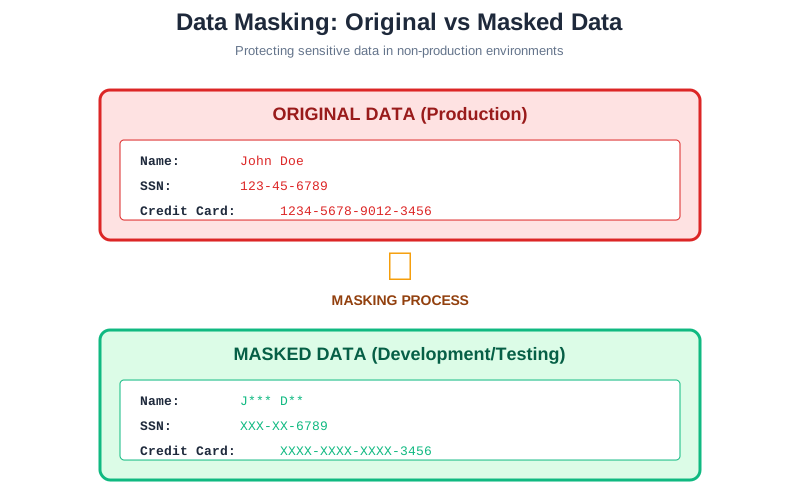
C. Data Masking (Obfuscation) 🎭
Definition:
Replacing sensitive data with realistic but fake data.
Use Case:
Developers need "real-looking" data to test a new app, but they should not see actual customer credit card numbers. Masking provides dummy data that looks real.
Techniques:
1. Substitution:
Real: John Smith → Masked: Jane Doe
(Replace with fake name from database)
2. Shuffling:
Column: SSN
Before: 123-45-6789, 987-65-4321
After:  987-65-4321, 123-45-6789
(Shuffle values within column - statistics preserved, individuals not)
3. Character Masking:
Credit Card: 1234-5678-9012-3456
Masked:      XXXX-XXXX-XXXX-3456
(Show only last 4 digits)
4. Nulling Out:
SSN: 123-45-6789 → NULL
(Delete entirely for non-production environments)
Production vs Non-Production:
- • Production: Real data (encrypted)
- • Development: Masked data (no real PII)
- • Testing: Synthetic data (completely fake but realistic)
Benefits:
- • Developers can test without PII exposure
- • Reduces compliance scope (masked data ≠ PII)
- • Prevents insider threats
D. Backup and Recovery 💾
Definition:
Creating copies of data to restore in case of data loss or corruption (Ransomware).
Rule:
Follow the 3-2-1 Rule:
- • 3 copies of data
- • 2 different media types (disk + tape)
- • 1 offsite (cloud, remote datacenter)
Backup Strategies:
Full Backup:
- • Complete copy of all data
- • Slowest, most storage
- • Fastest restore
Incremental Backup:
- • Only changed files since last backup
- • Fastest, least storage
- • Slower restore (need full + all incrementals)
Differential Backup:
- • All changes since last full backup
- • Middle ground
Backup Security:
- ✅ Encrypt backups (if stolen, data protected)
- ✅ Immutable backups (can't be altered by ransomware)
- ✅ Air-gapped backups (offline, disconnected)
- ✅ Test restores (verify backups work)
Ransomware Protection:
- • Regular backups = can restore without paying ransom
- • Offline backups = ransomware can't encrypt them
- • Version control = restore pre-infection version
⚠️ PII (Personally Identifiable Information) - Critical Exam Concept
Exams often ask you to identify PII. It is any data that can identify a specific person.
Direct PII (Identifies person alone):
- ✓ Full Name: "John Doe"
- ✓ Social Security Number (SSN): "123-45-6789"
- ✓ Passport Number
- ✓ Driver's License Number
- ✓ Email Address: john.doe@gmail.com
- ✓ Phone Number
- ✓ Biometric data (fingerprint, face scan)
- ✓ IP Address (in some contexts)
Indirect PII (Identifies person when combined):
- • Zip Code + Date of Birth + Gender = 87% of US population identifiable
- • Race + Date of Birth + Zip Code
- • Job Title + Company + City
Sensitive PII (Higher Protection Required):
- • Financial: Credit card numbers, bank accounts
- • Medical: Health records, prescriptions
- • Biometric: Fingerprints, DNA
- • Credentials: Passwords, security questions
Non-PII:
- • Aggregate statistics (average age of customers)
- • Anonymized data (can't trace back to individual)
- • Public data (published phone directory)
Goal: The primary goal of privacy laws is to protect PII.
Legal Requirements:
- • GDPR: PII = "personal data"
- • CCPA: PII = "personal information"
- • HIPAA: PHI (Protected Health Information) = medical PII
Exam Tip:
Question: "Which of the following is NOT PII?"
Watch for: Company name, city name (alone not PII)
Remember: Combination of indirect identifiers = PII
6. Data Protection Laws and Regulations
Compliance is mandatory, not optional.
GDPR (General Data Protection Regulation) 🇪🇺
The strictest privacy law in the world (European Union).
Key Provisions:
1. Lawful Basis for Processing:
- • Consent (explicit opt-in)
- • Contract (necessary for service)
- • Legal obligation
- • Vital interests (life/death)
- • Public task
- • Legitimate interests (balanced against user rights)
2. User Rights:
- • Right to Access: "What data do you have about me?"
- • Right to Rectification: "Correct my wrong address"
- • Right to Erasure ("Right to be Forgotten"): "Delete my data"
- • Right to Data Portability: "Give me my data in CSV format"
- • Right to Object: "Stop using my data for marketing"
3. Requirements:
- • Breach notification: 72 hours to authorities
- • Data Protection Officer (DPO): Required for large companies
- • Privacy by Design: Security built-in from start
- • DPIA: Data Protection Impact Assessment for high-risk processing
Penalties:
- • Tier 1: Up to €10M or 2% global revenue
- • Tier 2: Up to €20M or 4% global revenue
- • 2023: Meta fined €1.2 billion (largest GDPR fine)
Who It Applies To:
- • Any company processing EU residents' data (worldwide reach)
- • Even if company not in EU
CCPA (California Consumer Privacy Act) 🇺🇸
Similar to GDPR, protecting residents of California.
Key Rights:
- • Right to Know: What data collected, how used
- • Right to Delete: Request deletion
- • Right to Opt-Out: Stop data sale to third parties
- • Right to Non-Discrimination: Can't charge more for exercising rights
Scope:
Companies with CA residents' data AND:
- • Revenue > $25M, OR
- • Data on 50,000+ consumers, OR
- • 50%+ revenue from selling data
"Do Not Sell My Personal Information":
- • Must provide clear opt-out link on website
- • Verify user identity before deletion
- • Cannot deny service for opting out
HIPAA (Health Insurance Portability and Accountability Act) ðŸ¥
Protects medical records and health information in the USA.
Covered Entities:
- • Healthcare providers (doctors, hospitals)
- • Health plans (insurance companies)
- • Healthcare clearinghouses
- • Business associates (vendors with access to PHI)
Protected Health Information (PHI):
- • Medical history
- • Test results
- • Prescriptions
- • Insurance information
- • Any health data linked to individual
Requirements:
- • Privacy Rule: Limits use/disclosure of PHI
- • Security Rule: Technical safeguards (encryption, access control)
- • Breach Notification: 60 days to notify patients
Penalties:
- • Unknowing: $100-$50,000 per violation
- • Willful neglect: $50,000 per violation
- • Criminal: Up to $250,000 + 10 years prison
DPDP Act (Digital Personal Data Protection Act, India) 🇮🇳
The Digital Personal Data Protection Act, governing data processing in India.
Key Features:
- • Consent-based: Explicit user consent required
- • Purpose limitation: Use data only for stated purpose
- • Data localization: Some data must stay in India
- • User rights: Access, correction, deletion
- • Children's data: Parental consent required (under 18)
Penalties:
- • Up to ₹250 crore ($30M USD) per violation
Scope:
- • Applies to all companies processing Indian residents' data
- • Even foreign companies must comply