
System Calls in Operating Systems
🎯 Key Takeaways & Definition
Definition: A System Call is a programmatic way for a computer program to request a service from the kernel of the operating system.
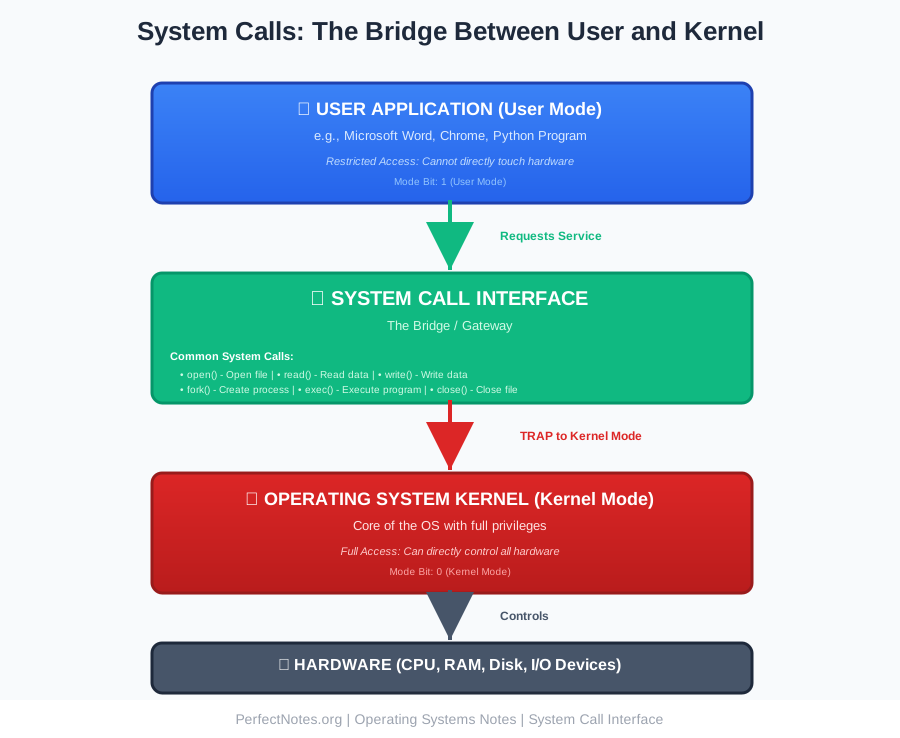
Core Concept: It acts as the bridge between User Mode (where applications run) and Kernel Mode (where the OS controls hardware).
Key Objective: To allow user-level programs to access restricted resources (like the Hard Disk or Printer) safely and securely.
Introduction to System Calls
When you write a program in C or Python to "print" text to the screen or "save" a file, your program cannot do it directly. Accessing hardware is dangerous; if every program could touch the hard disk directly, one bug could wipe your entire system. Instead, your program asks the Operating System to do it. This "ask" is the System Call.
Think of system calls as the receptionist at a secure building. You can't just walk into the restricted areas (hardware); you must ask the receptionist (OS kernel) to access them for you. This ensures security, prevents conflicts, and maintains system stability.
Need for System Calls
Hardware Abstraction
Programmers don't need to know the physics of a hard drive; they just call write().
Without System Calls: To save a file, you'd need to:
- Calculate exact disk sector locations
- Control spindle motor speed (5400/7200 RPM)
- Position read/write head using stepper motors
- Manage disk cache and buffer
- Handle concurrent access from other programs
- Implement error correction codes
- Deal with bad sectors
With System Calls:
write(file_descriptor, data, size);One line! The OS kernel handles all the complexity.
Security
Prevents applications from accessing memory or devices they shouldn't touch.
Security Benefits:
- ● Memory Protection: Program A can't read Program B's memory
- ● Resource Isolation: No app can monopolize CPU or RAM
- ● Access Control: Only authorized programs can access files
- ● Privilege Separation: User apps can't execute privileged instructions
Example: Without system calls, a malicious program could:
- Read passwords from another program's memory
- Wipe the entire hard disk
- Disable antivirus software
- Access webcam without permission
System calls prevent this by requiring OS permission for every hardware access.
Portability
A program using standard system calls can run on different hardware without changing the code.
Example: A program using POSIX system calls works on:
- Linux on Intel x86
- Linux on ARM (Raspberry Pi)
- macOS on Apple Silicon
- Unix on SPARC processors
The system calls remain the same; the OS handles hardware differences.
Multitasking
Allows the OS to manage competing requests from multiple programs safely.
Scenario: Three programs simultaneously want to print:
- Word document
- Chrome webpage
- Excel spreadsheet
With System Calls:
- Each program calls
print()system call - OS queues the print jobs
- OS sends them to printer one by one
- No conflicts, no data corruption
Without System Calls:
Programs would fight for printer control, resulting in garbled output or system crash.
User Mode and Kernel Mode
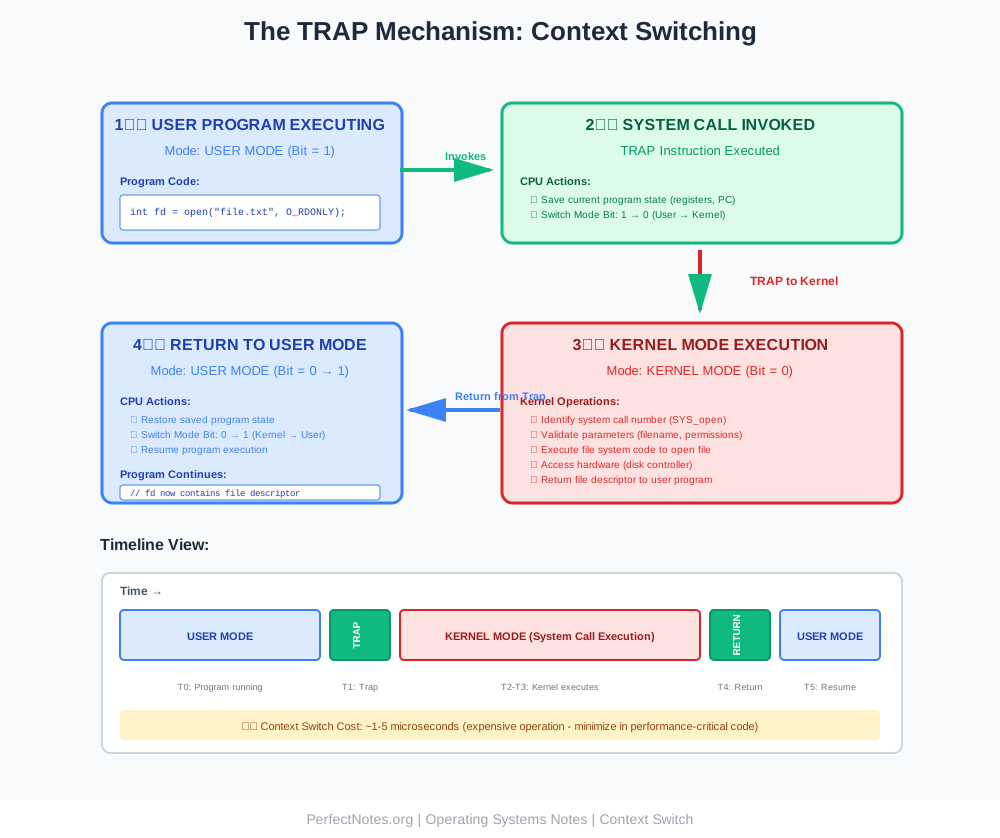
To protect the system, modern processors operate in two modes. A system call is the trigger that switches between them.
User Mode (Mode Bit = 1)
Restricted access. Applications run here. They cannot touch hardware directly.
Characteristics:
- Limited instruction set
- Cannot execute privileged CPU instructions
- Cannot access kernel memory
- Cannot directly control I/O devices
- If program crashes, only that program fails (not entire system)
What Runs Here:
- All user applications (Word, Chrome, games)
- User-level processes
- Application code
Kernel Mode (Mode Bit = 0)
Privileged access. The OS runs here with full control over the machine.
Characteristics:
- Full instruction set available
- Can execute privileged instructions (I/O, memory management)
- Access to all memory
- Direct hardware control
- If kernel crashes, entire system crashes (Blue Screen of Death)
What Runs Here:
- OS kernel code
- Device drivers
- System call handlers
Types of System Calls
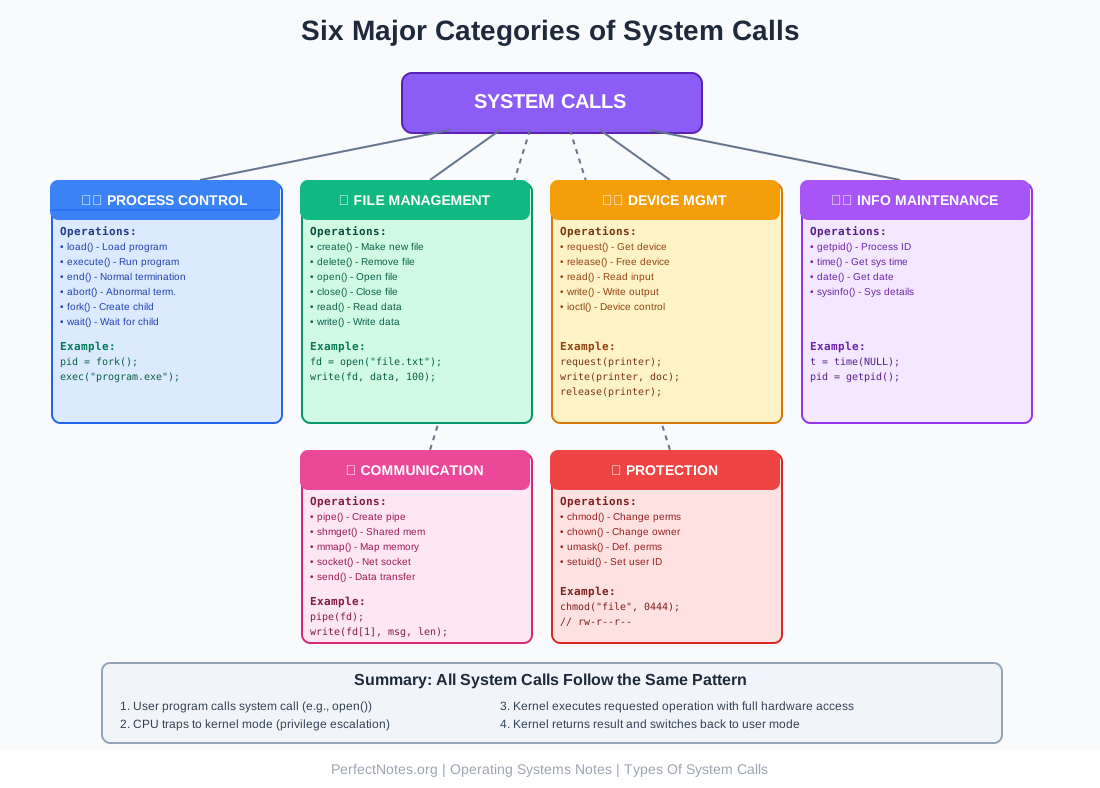
System calls are generally grouped into six major categories based on what they do.
Process Control
Handles program execution and process management.
Common System Calls:
load()- Load a program into memoryexecute()- Start program executionend()- Normal program terminationabort()- Abnormal termination (error)fork()- Create a child process (copy of current process)wait()- Parent process waits for child to completeexec()- Replace current process with new programexit()- Terminate calling process
Example in C (Linux):
#include <unistd.h>
#include <sys/wait.h>

int main() {
    pid_t pid = fork();  // Create child process

    if (pid == 0) {
        // Child process
        execl("/bin/ls", "ls", "-l", NULL);  // Run 'ls -l'
    } else {
        // Parent process
        wait(NULL);  // Wait for child to finish
        printf("Child completed\n");
    }
    return 0;
}
File Management
Handles file and directory operations.
Common System Calls:
create()- Create a new filedelete() / unlink()- Delete a fileopen()- Open a file for reading/writingclose()- Close an open fileread()- Read data from filewrite()- Write data to filelseek()- Move file pointer to specific positionstat()- Get file information (size, permissions, dates)
Example in C (Linux):
#include <fcntl.h>
#include <unistd.h>

int main() {
    int fd = open("data.txt", O_RDONLY);  // Open file for reading
    if (fd < 0) {
        perror("File open failed");
        return 1;
    }

    char buffer[100];
    int bytes = read(fd, buffer, sizeof(buffer));  // Read data

    close(fd);  // Close file
    return 0;
}
Device Management
Handles peripherals and I/O devices.
Common System Calls:
request() / ioctl()- Request device accessrelease()- Release deviceread()- Read from devicewrite()- Write to deviceioctl()- Device-specific control operations
Devices Managed:
- Printers
- Disk drives
- Tape drives
- USB devices
- Network cards
- Graphics cards
Example:
int printer = open("/dev/lp0", O_WRONLY);  // Open printer
write(printer, document, size);  // Print document
close(printer);  // Release printer
Information Maintenance
Handles system data and metadata.
Common System Calls:
getpid()- Get current process IDgetppid()- Get parent process IDtime()- Get current system timedate()- Get system dategettimeofday()- Get time with microsecond precisionsysinfo()- Get system information (uptime, memory)uname()- Get OS name and version
Example:
#include <time.h>
#include <unistd.h>
int main() {
pid_t my_pid = getpid(); // Get my process ID
time_t current_time = time(NULL); // Get current time
printf("PID: %d\n", my_pid);
printf("Time: %s", ctime(¤t_time));
return 0;
}Communication
Handles inter-process communication and networking.
Methods:
Shared Memory:
shmget()- Create shared memory segmentshmat()- Attach to shared memoryshmdt()- Detach from shared memory
Message Passing:
pipe()- Create pipe for IPCmsgget()- Create message queuemsgsnd() / msgrcv()- Send/receive messages
Network Communication:
socket()- Create network socketbind()- Bind socket to addresslisten()- Listen for connectionsaccept()- Accept connectionsend() / recv()- Send/receive data
Example (Pipe):
int fd[2];
pipe(fd);  // Create pipe

if (fork() == 0) {
    // Child writes to pipe
    close(fd[0]);
    write(fd[1], "Hello Parent!", 13);
    close(fd[1]);
} else {
    // Parent reads from pipe
    char buffer[20];
    close(fd[1]);
    read(fd[0], buffer, 13);
    printf("Received: %s\n", buffer);
    close(fd[0]);
}
Protection
Handles access control and permissions.
Common System Calls:
chmod()- Change file permissionschown()- Change file ownerchgrp()- Change file groupumask()- Set default file permissionssetuid()- Set user IDsetgid()- Set group ID
Example:
#include <sys/stat.h>

// Set file permissions to rw-r--r-- (644 in octal)
chmod("document.txt", S_IRUSR | S_IWUSR | S_IRGRP | S_IROTH);

// Or using octal notation
chmod("document.txt", 0644);
Implementation of System Calls
How does code actually trigger the OS?
The API
Programmers rarely write system calls directly (in Assembly). Instead, they use an Application Programming Interface (API) like the Win32 API (Windows) or POSIX API (Linux/Unix).
Popular APIs:
- ● POSIX API - Portable Operating System Interface (Linux, macOS, Unix)
- ● Win32 API - Windows API
- ● Java API - Java Virtual Machine provides OS abstraction
The Library
The standard C library (libc) provides wrapper functions. When you call printf(), the library internally calls the write() system call.
Example Flow:
User Program: printf("Hello World");
      ↓
C Library: Formats string, calls write()
      ↓
write() System Call: Traps to kernel
      ↓
Kernel: Sends data to display driver
      ↓
Hardware: Text appears on screen
Why This Layering:
- ● Portability: printf() works on any OS; the library handles OS differences
- ● Convenience: printf() handles formatting; write() is low-level
- ● Efficiency: Library can batch multiple printf() calls into one write()
Examples of System Calls Across Operating Systems
Here is how different OSs handle common tasks:
| Operation | Linux/Unix (POSIX) | Windows (Win32 API) |
|---|---|---|
| Create a Process | fork() | CreateProcess() |
| Open a File | open() | CreateFile() |
| Read a File | read() | ReadFile() |
| Write to File | write() | WriteFile() |
| Close a File | close() | CloseHandle() |
| Delete a File | unlink() | DeleteFile() |
| Get Process ID | getpid() | GetCurrentProcessId() |
| Allocate Memory | mmap() | VirtualAlloc() |
| Create Thread | pthread_create() | CreateThread() |
| Sleep | sleep() | Sleep() |
Key Difference:
- ● POSIX (Linux/Unix): Simple, lowercase names, minimal parameters
- ● Win32 (Windows): Verbose names (CamelCase), many parameters, more complex
⚠️ Critical Concept: System Call Overhead
System calls are "expensive" in terms of CPU time.
Context Switch:
Switching from User Mode to Kernel Mode takes time (~1-5 microseconds per call).
Why It's Expensive:
- ● Mode Switch: CPU changes privilege level (user → kernel → user)
- ● Register Saving: All CPU registers must be saved and restored
- ● Cache Flushing: CPU cache may need to be invalidated
- ● TLB Flush: Translation Lookaside Buffer (memory mapping) may be flushed
- ● Pipeline Stall: CPU instruction pipeline is disrupted
Performance Impact:
Scenario: A program makes 1 million system calls
- Time per system call: 2 microseconds
- Total overhead: 1,000,000 × 2μs = 2 seconds of pure overhead!
Optimization Strategies:
Bad (Many System Calls):
for (int i = 0; i < 1000000; i++) {
    write(fd, &data[i], 1);  // Write 1 byte at a time
}
// Result: 1 million system calls! Very slow!
Good (Batch System Calls):
write(fd, data, 1000000);  // Write all data at once
// Result: 1 system call! Much faster!
Real-World Impact:
- ● Games: Minimize system calls in render loop (60+ FPS requires <16ms per frame)
- ● High-Frequency Trading: Every microsecond counts; avoid system calls in critical path
- ● Database Systems: Use memory-mapped files (mmap()) to reduce I/O system calls
- ● Web Servers: Use sendfile() instead of read() + write() to avoid copying data
System Calls vs. Operating System Services
(Use this table to answer "Difference between..." questions)
| Feature | System Calls | OS Services |
|---|---|---|
| Definition | The programmatic interface to the kernel | The actual functionality provided by the OS |
| Who uses it? | Programmers (via code) | Users and Programs |
| Visibility | Low-level (e.g., read(), write()) | High-level (e.g., "File System Management") |
| Trigger | Triggered by a "Trap" instruction | Triggered by user action or system call |
| Example | fork(), exec(), open() | Process Management, I/O Operations |
| Abstraction Level | Low-level API | High-level concept |
| Mode | Executes in Kernel Mode | Concept (not tied to mode) |
| Implementation | Assembly/C library function | Kernel code implementing the service |
| Access Method | Function call in code | Through system calls or UI |
Relationship:
- ● OS Service = WHAT the OS does (e.g., "manage files")
- ● System Call = HOW you ask the OS to do it (e.g., open("file.txt"))
Analogy:
- ● OS Service = Restaurant menu item ("Burger")
- ● System Call = Ordering method (telling waiter "I want a burger")
Error Handling in System Calls
System calls can fail (e.g., trying to open a file that doesn't exist).
Return Values
Most system calls return -1 or NULL on failure, and a non-negative value on success.
Examples:
int fd = open("file.txt", O_RDONLY);
if (fd < 0) {
    // Error occurred!
}

pid_t pid = fork();
if (pid < 0) {
    // Fork failed!
}
Error Codes
The OS sets a global variable (like errno in C) to a specific code so the program knows why it failed.
Common Error Codes:
ENOENT- No such file or directoryEACCES- Permission deniedENOMEM- Out of memoryEINVAL- Invalid argumentEBADF- Bad file descriptorEEXIST- File already exists
Example with Error Handling:
#include <stdio.h>
#include <errno.h>
#include <string.h>
#include <fcntl.h>

int main() {
    int fd = open("nonexistent.txt", O_RDONLY);

    if (fd < 0) {
        printf("Error: %s\n", strerror(errno));

        if (errno == ENOENT) {
            printf("File does not exist!\n");
        } else if (errno == EACCES) {
            printf("Permission denied!\n");
        }
        return 1;
    }

    close(fd);
    return 0;
}
Output if file doesn't exist:
Error: No such file or directory
File does not exist!
Best Practices
- Always check return values from system calls
- Use
perror()orstrerror(errno)for descriptive error messages - Clean up resources even on error (close files, free memory)
- Log errors for debugging
- Provide user-friendly messages (don't just show errno numbers)
Library Functions vs System Calls
Understanding the relationship between library functions and system calls is crucial for effective systems programming.
The Layered Architecture:
1. Library Function Layer (High-Level):
   printf("Number: %d\n", 42);
   ↓
2. Library Implementation:
   Formats string, manages buffer
   ↓
3. System Call Layer (Low-Level):
   write(1, "Number: 42\n", 11);
   ↓
4. Kernel Execution:
   Validates, writes to device
   ↓
5. Hardware:
Display driver renders text| Aspect | Library Function | System Call |
|---|---|---|
| Level | High-level | Low-level |
| Example | printf(), malloc(), fopen() | write(), brk(), open() |
| Buffering | Yes (for efficiency) | No (direct I/O) |
| Portability | Portable (works on any OS) | OS-specific |
| Overhead | Higher (formatting + system call) | Lower (direct kernel access) |
| User Mode | Executes in user mode | Triggers kernel mode |
Performance Example: Buffering Matters!
Scenario: Write 1 million bytes to a file
Method 1: Direct System Calls (Slow)
for (int i = 0; i < 1000000; i++) {
    write(fd, &data[i], 1);  // 1 million system calls
}
// Time: ~2 seconds (due to context switch overhead)
Method 2: Library Buffering (Fast)
FILE *fp = fopen("file.txt", "w");
for (int i = 0; i < 1000000; i++) {
    fputc(data[i], fp);  // Library buffers internally
}
fclose(fp);  // Flush buffer to disk
// Time: ~0.01 seconds (only ~10 system calls)
Performance Gain: 200x faster!
When to Use Each
Use Library Functions When:
- ✅Writing portable code
- ✅Need convenience features (formatting, buffering)
- ✅Don't need maximum performance
- ✅Developing application-level software
Use System Calls Directly When:
- ✅Need maximum control
- ✅Writing low-level system software (OS, drivers)
- ✅Specific OS features not exposed by libraries
- ✅Performance-critical code (avoid library overhead)
Key Takeaway:
Library functions are built on top of system calls. They don't replace system calls; they make them easier to use. Understanding this layering is crucial for effective systems programming.