
Introduction to Operating Systems
🔑 Key Takeaways & Definition
- ● Definition: An Operating System (OS) is system software that manages computer hardware and software resources and provides common services for computer programs.
- ● Core Concept: It acts as an interface between the computer user and the computer hardware.
- ● Key Objective: To make the computer system convenient to use and to use computer hardware in an efficient manner.
- ● Booting: The OS is the first program loaded into memory when the computer is turned on via a process called Booting.
Introduction to Operating System
Every computer requires an Operating System to function. Without it, a computer is just a pile of metal and silicon. The OS is the first program loaded into memory when the computer is turned on (via a process called Booting) and manages all other application programs.
In the modern computing landscape, the OS is more critical than ever. Whether you are using a personal computer, smartphone, tablet, or server, an OS is responsible for:
- ● Resource Management: Allocating CPU time, memory, disk space, and other hardware resources efficiently.
- ● User Interface: Providing a way for users to interact with the computer (CLI or GUI).
- ● Application Management: Running and managing multiple programs simultaneously.
- ● Security: Protecting data and preventing unauthorized access.
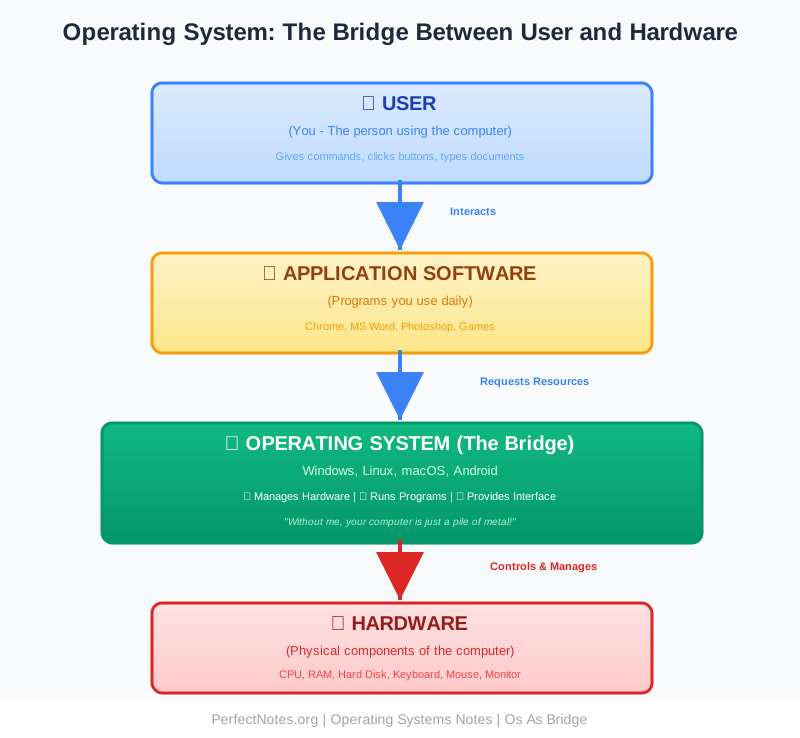
Definition of Operating System
An Operating System is a program that controls the execution of application programs and acts as an interface between the user of a computer and the computer hardware.
Examples include Microsoft Windows, Linux, macOS, Android, and iOS. Each operating system is designed for specific use cases—distributed systems for servers, time-sharing systems for desktop computers, and real-time systems for embedded devices.
Functions of Operating System
The OS creates an environment where users can execute programs efficiently. Its primary functions include:
- ● Process Management: Creating, scheduling, and terminating processes (programs in execution). It decides which process gets the CPU and for how long using scheduling algorithms.
- ● Memory Management: Tracking how much memory is used and by whom. It allocates memory when a process requests it and de-allocates it when the process finishes.
- ● File System Management: Organizing data on storage drives (Hard Disk) into files and directories (folders) for easy retrieval and organization.
- ● Device Management: Managing Input/Output devices (Mouse, Keyboard, Printer, Network Card) using specific driver software.
- ● Security and Protection: Protecting data and resources from unauthorized access using passwords, encryption, and firewalls.
Types of Operating System
Operating systems have evolved to meet different needs and use cases. Understanding the different types is crucial for exam preparation.
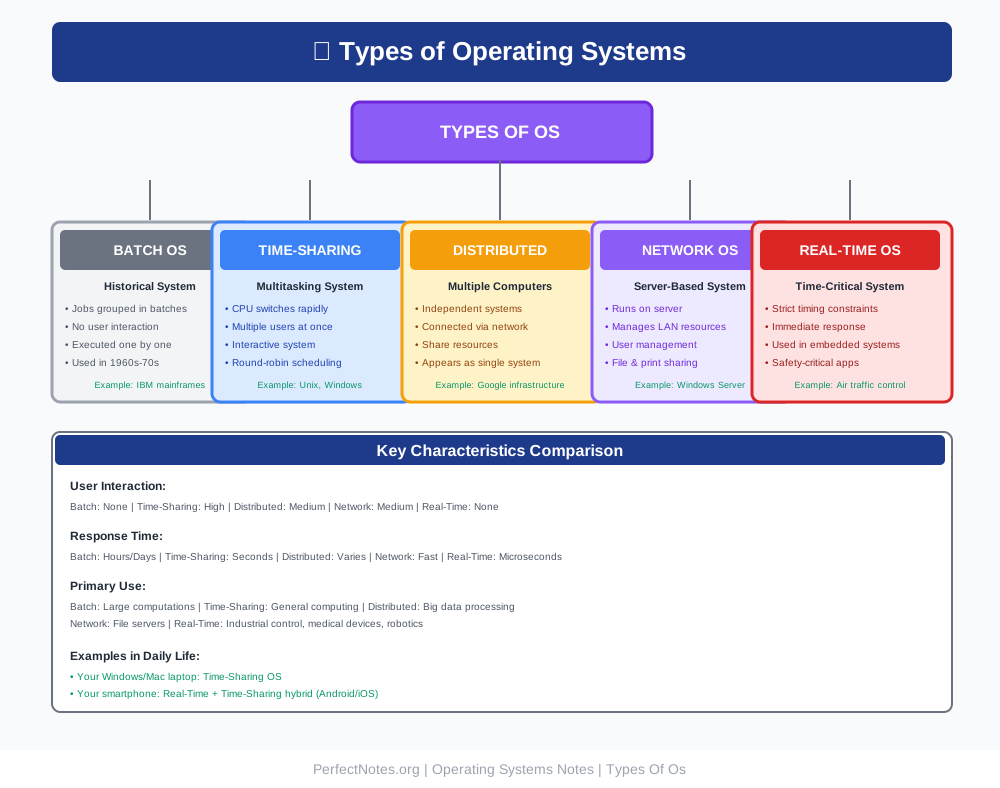
Batch Operating System
The user does not interact directly with the computer. Similar jobs are grouped into "batches" and executed one after another. Historical importance - used in 1960s-70s.
- ● No user interaction during execution
- ● Jobs grouped and processed sequentially
- ● Slow turnaround time (hours/days)
- ● Example: IBM mainframes
Time-Sharing Operating System
The CPU executes multiple jobs by switching among them so frequently that users can interact with each program while it is running. This is called Multitasking.
- ● Multiple users can access the system simultaneously
- ● CPU time is divided using round-robin scheduling
- ● Interactive system with quick response time (seconds)
- ● Example: Unix, Windows, modern desktop OSs
Distributed Operating System
Multiple independent computers communicate over a network to share resources and computation tasks. The system appears as a single integrated computer to users.
- ● Autonomous computers connected via network
- ● Resources are shared transparently
- ● Highly reliable and fault-tolerant
- ● Example: Google's distributed infrastructure, cloud systems
Network Operating System
Runs on a server and manages data, users, groups, security, and applications on a local area network (LAN). It supports centralized control and management.
- ● Server-based architecture
- ● Manages user accounts and permissions
- ● Supports file and printer sharing
- ● Example: Windows Server, Novell NetWare
Real-Time Operating System (RTOS)
Used in systems where rigid time requirements are placed on the operation of a processor or the flow of data. Must guarantee response times measured in microseconds.
- ● Strict timing constraints (hard real-time)
- ● Deterministic behavior—predictable responses
- ● Used in safety-critical applications
- ● Example: Air traffic control, medical devices, automotive systems
Architecture of Operating System
The structure of an OS is often organized in layers, with each layer having specific responsibilities:
Kernel
The core of the operating system. It has complete control over everything in the system. It is the first part of the OS to load during boot and remains in memory throughout the system's operation.
Responsibilities: Process management, memory management, interrupt handling, device control.
Shell
The user interface that allows access to the kernel's services. It interprets user commands and translates them into kernel operations.
Types: Command Line Interface (CLI) or Graphical User Interface (GUI).
System Calls
The programming interface used by applications to request services from the kernel. These are the bridge between user programs and kernel functions.
Examples: read(), write(), open(), close(), fork(), exec().
User Interface
The visual part users interact with. Can be:
- ● CLI (Command Line Interface): Text-based, requires typing commands (Linux, Windows Command Prompt)
- ● GUI (Graphical User Interface): Visual icons and windows (Windows, macOS, modern Linux)
⚠️ Limitations of Operating System (Exam Focus)
While essential, OSs have significant challenges:
- ● Complexity: Developing and maintaining an OS is extremely complex and error-prone. Modern OSs contain millions of lines of code.
- ● Cost: Proprietary OSs (like Windows) can be expensive for organizations. Enterprise licensing can cost millions.
- ● Vulnerability: If the OS fails or is compromised (hacked), the entire system and all user data are at risk.
- ● Fragmentation: Different OSs (Android vs iOS) mean software developers must write code twice to support all platforms.
Process & Memory Management
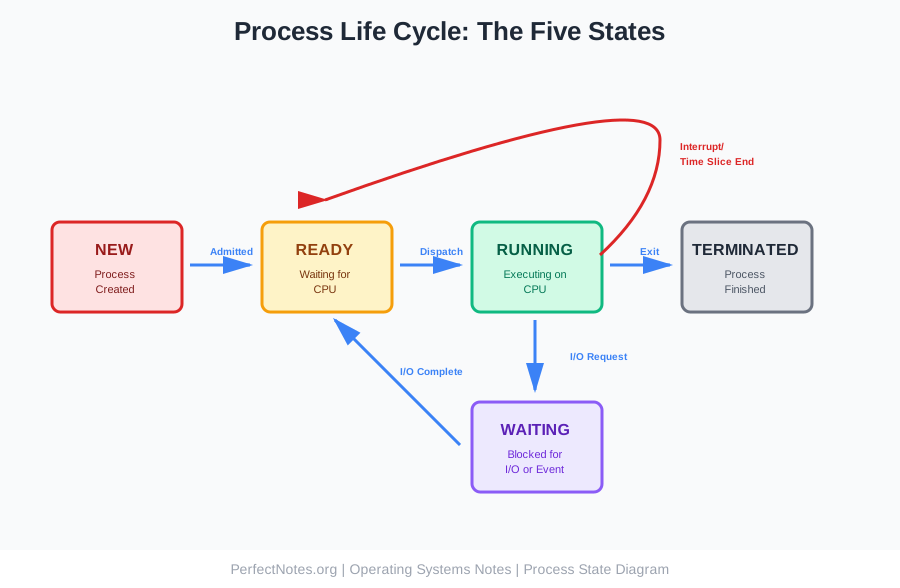
Process States
A process changes state as it executes. Understanding the five states is crucial for exams:
- ● New: The process is just created but not yet admitted to ready queue.
- ● Ready: The process is ready to execute but waiting for CPU allocation.
- ● Running: The process is executing instructions on the CPU.
- ● Waiting: The process is blocked waiting for I/O or an event to complete.
- ● Terminated: The process has finished execution.
CPU Scheduling
The art of deciding which process runs next. Scheduling ensures fair CPU allocation and system responsiveness.
Algorithms: First-Come-First-Serve (FCFS), Round Robin (RR), Priority Scheduling, Shortest Job First (SJF).
Paging
A memory management scheme that eliminates the need for contiguous allocation of physical memory. It divides memory into fixed-size blocks:
- ● Page: A fixed-size block of logical memory
- ● Frame: A fixed-size block of physical memory
- ● Allows processes to be loaded non-contiguously
Virtual Memory
A technique that allows execution of processes that are not completely in memory. It uses the hard disk as temporary RAM.
Benefits: Makes the computer feel like it has more memory than it physically possesses. Enables larger programs to run on limited RAM.
File System
File Organization
Files are mapped onto physical storage. The OS abstracts the physical properties of storage devices to define a logical storage unit—the file.
Directory Structure
A collection of nodes containing information about all files (Name, Type, Location, Size). Structures include:
- ● Single-level: All files in one directory (simple, limited)
- ● Two-level: Master directory + user directories
- ● Tree-structured: Hierarchical directory structure (modern OSs)
Access Methods
How data is read from the file:
- ● Sequential Access: Reading data in order from start to end
- ● Direct Access: Jumping directly to a specific location in the file
Operating System vs. Application Software
This distinction is frequently tested in exams. Use this table for quick reference:
| Feature | Operating System | Application Software |
|---|---|---|
| Definition | Software that manages system resources | Software for specific user tasks |
| Dependency | Does not need Apps to run | Cannot run without OS |
| Usage | General system management | Specific tasks |
| Examples | Windows, Linux, macOS, Android | Chrome, Word, Photoshop, Spotify |
| Booting | Loads automatically on startup | Loads when user launches it |
| Purpose | Manages hardware, provides services | Performs user-specific functions |
Examples of Operating Systems
Desktop & Server Operating Systems
- ● Windows: Developed by Microsoft. Dominates the personal computer market with user-friendly GUI. Versions: Windows 10, Windows 11.
- ● Linux: Open-source and free. Widely used in servers, supercomputers, and as the basis for Android. Distributions: Ubuntu, Fedora, CentOS.
- ● macOS: Developed by Apple. Known for stability, security, and integration with Apple hardware. Uses Unix-based kernel.
Mobile Operating Systems
- ● Android: A mobile OS based on the Linux kernel, developed by Google. Open-source, used by Samsung, OnePlus, Xiaomi.
- ● iOS: A mobile OS developed by Apple for iPhone and iPad. Closed-source, highly optimized for Apple devices.
Future Trends in Operating Systems
- ● Cloud Operating Systems: OSs designed to run in cloud computing environments with minimal overhead. Example: Chrome OS, which relies on cloud storage and web applications.
- ● AI Integration: OSs using Artificial Intelligence to optimize resource allocation, predict system behavior, and enhance security proactively with anomaly detection.
- ● Containerization: Technologies like Docker and Kubernetes enabling lightweight virtualization and microservices architecture.
- ● Edge Computing: OS designed for IoT devices and edge computing scenarios where processing happens at the network edge rather than centralized servers.
- ● Quantum-Ready encryption: Future OSs will need quantum-resistant encryption as quantum computing becomes mainstream.