
Introduction to Firewall
🔑 Key Takeaways & Definition
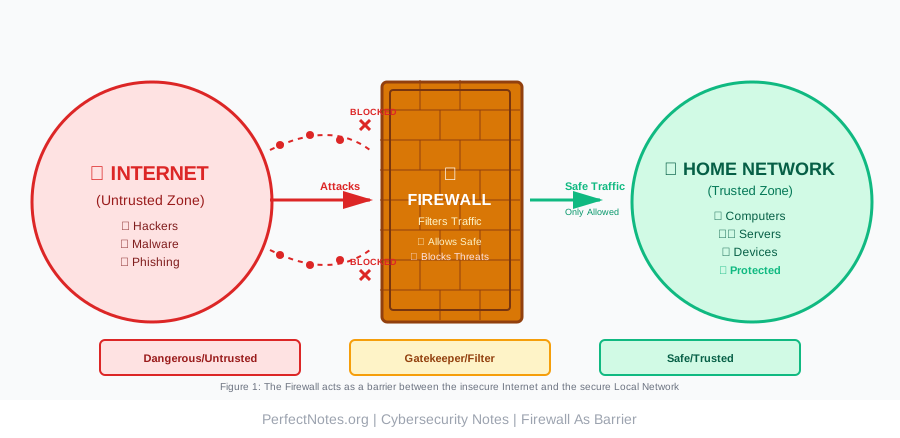
- ● Definition: A Firewall is defined as a network security device that monitors and filters incoming and outgoing network traffic based on an organization's previously established security policies.
- ● Core Function: It acts as a barrier between a trusted internal network and an untrusted external network (like the Internet/Cyberspace).
- ● Key Objective: To allow valid traffic to pass while blocking malicious traffic.
What is a Firewall?
In the physical world, a firewall is a fire-resistant wall intended to prevent the spread of fire. In cybersecurity, it prevents the spread of cyber threats. It acts as the "Gatekeeper" of your computer network. Without a firewall, your network is like a house with the front door wide open—anyone can walk in.
Need for Firewall
- ● Unauthorized Access: Prevents hackers from gaining remote access to your system.
- ● Malicious Content: Blocks malware and viruses from entering via the internet.
- ● Privacy Protection: Hides your internal network details (IP addresses) from the outside world using NAT (Network Address Translation).
- ● Content Filtering: Prevents employees or users from accessing harmful or non-productive websites.
Functions of a Firewall
- ● Traffic Monitoring: Continuously inspects data packets entering and leaving the network.
- ● Access Control: Decides who can enter the network based on rules (e.g., "Block IP 192.168.1.50").
- ● Packet Filtering: Analyzes the header of data packets to check source/destination IPs and ports.
- ● Threat Prevention: Modern firewalls integrate with antivirus databases to block known threats.
Types of Firewall
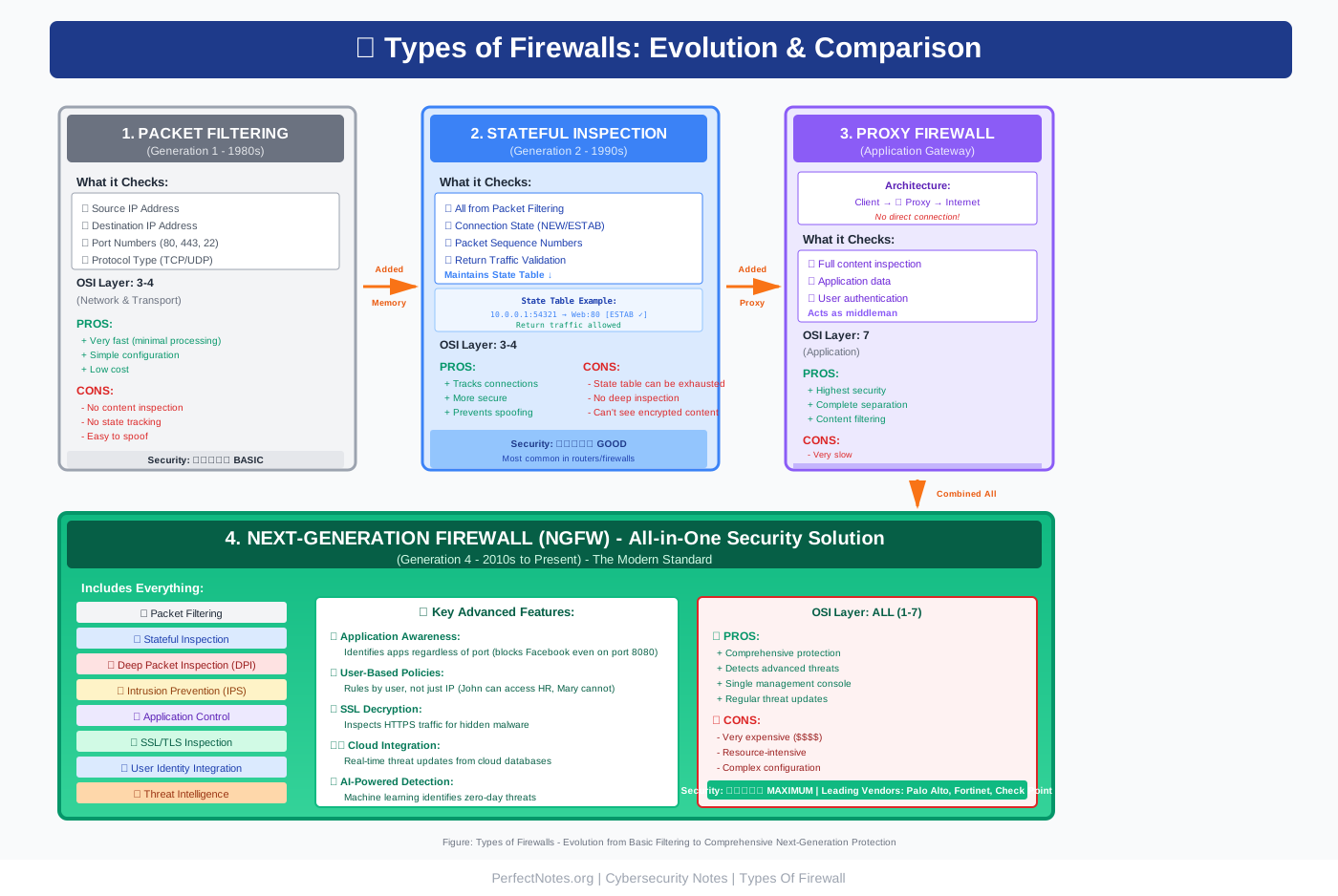
Firewalls are classified based on how they filter data and at which layer of the OSI model they operate.
Packet Filtering Firewall
What it is: The oldest and simplest type of firewall.
How it works:
- Checks packet headers (Source IP, Destination IP, Port number, Protocol)
- Compares against a list of rules
- Allows or blocks based on simple criteria
Characteristics:
- ● Fast: Minimal processing required
- ● Stateless: Each packet evaluated independently
- ● Low security: Does not inspect packet contents
- ● OSI Layer: Works at Network Layer (Layer 3) and Transport Layer (Layer 4)
Example Rule:
DENY any traffic from IP 192.168.1.50
ALLOW HTTP traffic (Port 80) to web server
DENY all other traffic
Advantages:
- Very fast processing
- Low resource consumption
- Simple to configure
- Inexpensive
Disadvantages:
- No content inspection
- Vulnerable to spoofing attacks
- No application awareness
- Cannot detect sophisticated attacks
Use Case: Basic network perimeter protection, legacy systems
Stateful Inspection Firewall
What it is: A dynamic firewall that tracks the state of active connections.
How it works:
- Maintains a "state table" of all active connections
- Remembers if a packet is part of an existing conversation
- Allows return traffic without re-checking every single packet
- Tracks connection state: NEW, ESTABLISHED, RELATED, INVALID
Example:
User initiates connection to website:
1. Outbound packet: ALLOW (new connection)
2. Firewall remembers this connection
3. Return packet: ALLOW (part of established connection)
4. No need to check rules again
State Table Example:
Source IP    | Dest IP      | Source Port | Dest Port | State
-------------|--------------|-------------|-----------|------------
192.168.1.10 | 93.184.216.34| 54321      | 80        | ESTABLISHED
192.168.1.15 | 142.250.80.46| 54322      | 443       | ESTABLISHED
Characteristics:
- ● Stateful: Tracks connection context
- ● More intelligent: Understands packet relationships
- ● Better security: Harder to spoof
- ● OSI Layer: Network (Layer 3) and Transport (Layer 4)
Advantages:
- More secure than packet filtering
- Prevents certain types of attacks (TCP SYN flood)
- Better performance (doesn't recheck established connections)
- Understands protocols (TCP three-way handshake)
Disadvantages:
- More resource-intensive than packet filtering
- State table can be exhausted (DoS attack)
- Still no deep packet inspection
- Cannot see encrypted content
Use Case: Enterprise network perimeters, most modern firewalls
Proxy Firewall (Application-Level Gateway)
What it is: Acts as an intermediary (middleman) between clients and servers.
How it works:
- Client connects to proxy firewall
- Proxy firewall connects to destination on behalf of client
- Creates complete separation (no direct connection)
- Inspects entire communication at application layer
Architecture:
Client → Proxy Firewall → Internet → Server

Client thinks it's talking to proxy
Server thinks it's talking to proxy
No direct connection between client and server
Types:
- ● Forward Proxy: Client-side proxy (hides client identity)
- ● Reverse Proxy: Server-side proxy (protects servers)
Characteristics:
- ● Deep inspection: Can read application data
- ● Complete separation: Two separate connections
- ● Application awareness: Understands HTTP, FTP, etc.
- ● OSI Layer: Application Layer (Layer 7)
Advantages:
- Highest level of security
- Can inspect encrypted traffic (SSL/TLS termination)
- Content filtering (block specific websites)
- Caching capabilities (improves performance)
- Anonymity (hides internal IP addresses)
- Can authenticate users before allowing access
Disadvantages:
- Significant performance overhead
- Single point of failure
- Complex configuration
- Not all protocols supported
- Can break some applications
Use Case:
- High-security environments
- Content filtering (schools, offices)
- Reverse proxy for web servers
Next-Generation Firewall (NGFW)
What it is: The modern standard combining traditional firewall with advanced security features.
Key Features:
1. Deep Packet Inspection (DPI)
- Inspects packet headers AND payload content
- Looks inside the data, not just addresses
- Can detect malware hidden in legitimate traffic
2. Application Awareness and Control
- Identifies applications regardless of port
- Example: Blocks Facebook even if user changes ports
- Can allow Skype but block BitTorrent
3. Intrusion Prevention System (IPS)
- Actively blocks known attack signatures
- Real-time threat detection
- Signature-based and anomaly-based detection
4. SSL/TLS Inspection
- Decrypts HTTPS traffic
- Inspects encrypted content
- Re-encrypts before forwarding
5. User Identity Awareness
- Rules based on users, not just IP addresses
- Example: "John can access HR server, Mary cannot"
- Integrates with Active Directory
6. Threat Intelligence Integration
- Connects to cloud databases
- Updates with latest threat signatures
- Real-time protection against zero-days
Architecture:
Traditional Firewall +
Application Control +
IPS +
SSL Inspection +
Threat Intelligence +
User Identity =
NGFW
Characteristics:
- ● Multi-layered: Combines multiple security functions
- ● Intelligent: Uses AI/ML for threat detection
- ● Comprehensive: All-in-one security solution
- ● OSI Layers: All layers (1-7)
Advantages:
- Comprehensive security in one device
- Detects advanced threats
- Application-level control
- User-based policies
- Regular updates from cloud
- Simplified management
Disadvantages:
- Expensive
- Resource-intensive
- Complex configuration
- Requires regular updates
- Can impact network performance
- Vendor lock-in
Leading NGFW Vendors:
- Palo Alto Networks
- Cisco Firepower
- Fortinet FortiGate
- Check Point
- Sophos XG
Use Case: Enterprise networks, data centers, organizations requiring compliance (PCI-DSS, HIPAA)
Firewall Deployment Models
Network-Based Firewall
What it is: Hardware devices placed at the edge of a network to protect the entire organization.
Characteristics:
- Physical appliance (Cisco ASA, Palo Alto PA-Series)
- Protects entire network
- High throughput (Gbps)
- Placed at network perimeter
Advantages:
- Centralized management
- High performance
- Protects all devices
- Dedicated hardware
Disadvantages:
- Expensive
- Single point of failure
- Requires physical space
- Complex to maintain
Placement:
Internet → Router → Network Firewall → Switch → Internal NetworkHost-Based Firewall
What it is: Software installed on individual devices.
Examples:
- Windows Defender Firewall
- macOS Firewall
- iptables (Linux)
- Third-party: Norton, McAfee
Characteristics:
- Protects individual device
- Software-based
- User-configurable
Advantages:
- No additional hardware
- Protects mobile devices
- Defense in depth (even inside network)
- Free (built into OS)
Disadvantages:
- Must be configured on each device
- Users can disable it
- Consumes device resources
- Decentralized management
Use Case:
- Individual workstations
- Laptops
- Mobile workers
- Defense in depth strategy
Cloud Firewall (FWaaS - Firewall-as-a-Service)
What it is: Cloud-based firewall protecting cloud infrastructure and remote users.
How it works:
- Traffic routed through cloud service
- Firewall rules applied in cloud
- Protects cloud workloads (AWS, Azure, GCP)
Characteristics:
- Scalable (elastic)
- Managed service
- No hardware to maintain
- Global coverage
Advantages:
- Scalability (grows with demand)
- No capital expenditure
- Always updated
- Protects distributed workforce
- Easy deployment
Disadvantages:
- Subscription costs
- Dependent on internet connection
- Potential latency
- Vendor dependency
Leading Providers:
- Cloudflare Magic Firewall
- Zscaler
- Palo Alto Prisma Access
- AWS Network Firewall
- Azure Firewall
Use Case: Cloud-native applications, remote workforce, multi-cloud environments
⚠️ Critical Limitations of Firewalls
A firewall is not a silver bullet. It has blind spots:
- ● Insider Threats: A firewall cannot stop an attack if the hacker is already inside the building (e.g., a malicious employee with valid credentials).
- ● Social Engineering: It cannot prevent a user from voluntarily handing over their password in a Phishing scam or clicking a malicious link.
- ● Encrypted Traffic: Traditional firewalls cannot read encrypted (HTTPS) traffic, meaning malware can hide inside secure connections unless SSL Inspection is enabled.
- ● Zero-Day Attacks: Cannot block attacks exploiting unknown vulnerabilities (no signature exists yet).
- ● Application Layer Attacks: Traditional firewalls may miss attacks embedded in legitimate protocols (SQL injection in HTTP).
- ● Misconfiguration: Incorrectly configured firewall rules can create security gaps or block legitimate traffic.
- ● Performance Bottlenecks: Deep inspection can slow network traffic, especially with high volumes.
Firewall vs. IDS vs. IPS
(Use this table to answer "Difference between..." questions)
| Feature | Firewall | IDS (Intrusion Detection) | IPS (Intrusion Prevention) |
|---|---|---|---|
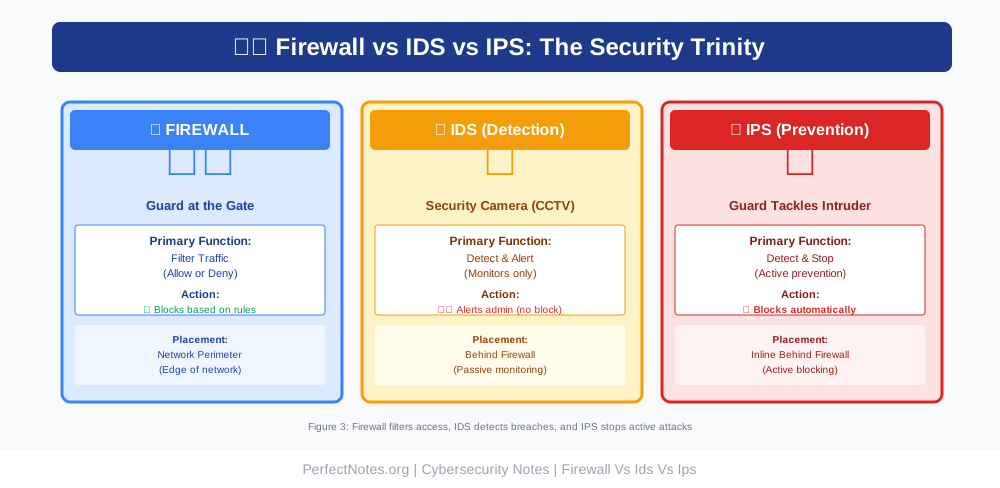
| Primary Goal | Filter traffic (Allow/Deny). | Detect attacks. | Stop attacks. |
| Action | Blocks traffic based on IP/Port rules. | Alerts the admin but allows traffic. | Blocks malicious packets automatically. |
| Placement | Network Perimeter (Edge). | Behind the Firewall (Internal). | Inline (Behind Firewall). |
| Mode | Active (blocks traffic). | Passive (monitors traffic). | Active (blocks traffic). |
| Response | Immediate (block or allow). | After-the-fact (generates alert). | Real-time (stops attack). |
| False Positives Impact | Can block legitimate traffic. | Generates alerts (doesn't block). | Can block legitimate traffic. |
| Analogy | Security Guard at the gate. | Security Camera (CCTV). | Guard who tackles the intruder. |
| Example | Block all traffic from China. | Alert: "SQL injection detected." | Block packet containing SQL injection. |
Key Distinction:
- ● Firewall: Preventive (based on rules)
- ● IDS: Detective (finds attacks)
- ● IPS: Preventive (stops attacks)
Modern Approach: Many organizations use all three in combination (Defense in Depth):
Internet → Firewall → IPS → Internal Network → IDSConfiguration & Management
Firewalls operate on "Rules" or "Policies." A rule typically consists of:
Rule Components:
1. Source:
- Where is the traffic coming from?
- Example: IP 10.0.0.1, Subnet 192.168.1.0/24, "Any"
2. Destination:
- Where is it going?
- Example: Web Server 203.0.113.50, "Internal Network"
3. Service/Protocol:
- What type of traffic?
- Example: HTTP (Port 80), HTTPS (Port 443), SSH (Port 22)
4. Action:
- What to do with the traffic?
- Options: ALLOW or DENY (sometimes LOG)
5. Time:
- When is the rule active?
- Example: "Business hours only"
Example Firewall Rules:
Rule #1: ALLOW TCP from 192.168.1.0/24 to 203.0.113.50 Port 80
         (Allow internal network to access web server)

Rule #2: DENY TCP from Any to 192.168.1.10 Port 22
         (Block SSH access to admin server from internet)

Rule #3: ALLOW TCP from 10.0.0.5 to Any Port 443
         (Allow CEO's computer to access any HTTPS site)

Rule #4: DENY all
         (Block everything else - default deny)
Rule Ordering - CRITICAL:
Firewalls read rules from top to bottom. If a packet matches Rule #1, it stops checking.
Example of Order Importance:
⌠WRONG ORDER:
Rule #1: ALLOW all from 192.168.1.0/24
Rule #2: DENY from 192.168.1.50
Result: 192.168.1.50 is allowed (Rule #1 matches first!)
✅ CORRECT ORDER:
Rule #1: DENY from 192.168.1.50
Rule #2: ALLOW all from 192.168.1.0/24
Result: 192.168.1.50 is blocked correctly.
Best Practices:
- Specific rules at the top
- General rules at the bottom
- Always end with "Deny All" (implicit deny)
- Document each rule (why it exists)
- Regular audits (remove unused rules)
- Test before implementing (staging environment)
- Least privilege principle (deny by default, allow only necessary)
Default Deny vs. Default Allow:
Default Deny (Recommended):
DENY all traffic by default
ALLOW only necessary traffic explicitly
Security: High (whitelist approach)
Default Allow (Not Recommended):
ALLOW all traffic by default
DENY only known bad traffic
Security: Low (blacklist approach)
Firewall Architecture & Placement
Common Architectures:
1. Single Firewall (Basic):
Internet → Firewall → Internal NetworkUse: Small organizations, home networks
2. DMZ (Demilitarized Zone):
Internet → External Firewall → DMZ (Public Servers) → Internal Firewall → Private NetworkPurpose:
- Isolate public-facing servers
- Protect internal network even if DMZ is compromised
DMZ contains:
- Web servers
- Email servers
- DNS servers
- FTP servers
3. Multi-Tier (Enterprise):
Internet → Edge Firewall → DMZ → Internal Firewall → Data Center → Internal Firewall → User NetworkPurpose: Multiple security zones with different trust levels
4. Zero Trust Architecture:
Micro-segmentation with firewalls between all zonesPrinciple: "Never trust, always verify"
Applications (Use Cases)
Enterprise Security:
Protecting corporate data centers and employee workstations from external threats.
Implementation:
- NGFW at perimeter
- Host-based firewalls on endpoints
- Internal segmentation firewalls
Data Center Protection:
Securing servers that host critical applications and sensitive data.
Features:
- East-West traffic filtering (server-to-server)
- Micro-segmentation
- Application-aware policies
Parental Control:
Home routers use firewalls to block adult content sites and inappropriate material.
Features:
- URL filtering
- Category-based blocking
- Time-based restrictions
VPN Gateways:
Firewalls often manage secure remote access for employees working from home.
Features:
- VPN termination
- Two-factor authentication
- Split tunneling control
Compliance Requirements:
Meeting regulatory standards (PCI-DSS, HIPAA, GDPR, SOC 2).
Requirements:
- Logging all traffic
- Segmentation of sensitive data
- Regular rule reviews
- Audit trails
Cloud Security:
Protecting cloud workloads and applications.
Use Cases:
- AWS Security Groups
- Azure Firewall
- GCP Firewall Rules
- Cloud-to-cloud connectivity
Firewall Technologies & Features
NAT (Network Address Translation):
What it does:
- Hides internal IP addresses
- Conserves public IP addresses
- Adds security layer
Types:
- ● Static NAT: One-to-one mapping
- ● Dynamic NAT: Pool of public IPs
- ● PAT (Port Address Translation): Many-to-one (most common)
Example:
Internal IP: 192.168.1.10
Public IP: 203.0.113.50
Internet sees only 203.0.113.50
VPN Support:
Types:
- ● Site-to-Site VPN: Connect two offices
- ● Remote Access VPN: Connect individual users
- ● SSL VPN: Browser-based access
Protocols:
- IPsec
- SSL/TLS
- WireGuard
Logging & Monitoring:
What to log:
- Allowed connections
- Denied connections
- Configuration changes
- Security events
Integration:
- SIEM (Security Information and Event Management)
- Syslog servers
- SNMP monitoring
High Availability (HA):
Purpose: Eliminate single point of failure
Methods:
- ● Active/Passive: One active, one standby
- ● Active/Active: Both processing traffic
- ● Clustering: Multiple firewalls as one logical unit
Technologies:
- VRRP (Virtual Router Redundancy Protocol)
- HSRP (Hot Standby Router Protocol)
- State synchronization
Future of Firewall Technology
Zero Trust Architecture:
The firewall assumes no one is trusted, even inside the network.
Principles:
- Verify explicitly
- Use least privilege access
- Assume breach
Implementation:
- Identity-based policies
- Micro-segmentation
- Continuous verification
AI-Driven Security:
Using Machine Learning to identify zero-day threats that have no known signature.
Capabilities:
- Behavioral analysis
- Anomaly detection
- Predictive threat intelligence
- Automated response
Cloud-Native Firewalls:
Purpose-built for cloud environments.
Features:
- API-driven management
- Auto-scaling
- Multi-cloud support
- Container awareness
SD-WAN Integration:
Combining firewall with Software-Defined Wide Area Network.
Benefits:
- Dynamic path selection
- Application-aware routing
- Simplified management
5G Security:
Firewalls adapted for 5G networks.
Challenges:
- Increased bandwidth
- IoT proliferation
- Edge computing
- Network slicing
Conclusion
Firewalls remain the first line of defense in network security. While no single technology can provide complete protection, modern Next-Generation Firewalls (NGFW) offer comprehensive security by combining:
- Traditional packet filtering
- Stateful inspection
- Deep packet inspection
- Application control
- Intrusion prevention
- Threat intelligence
Key Takeaways:
- Firewalls filter traffic based on rules
- Different types serve different purposes
- Proper configuration is critical
- Firewalls have limitations (insider threats, social engineering)
- Defense in Depth requires multiple security layers based on the CIA Triad
- Regular updates and monitoring are essential
Best Practices:
- Implement Defense in Depth
- Use NGFW for comprehensive protection
- Follow least privilege principle
- Regular rule audits
- Enable logging and monitoring
- Keep firmware updated
- Test configurations before deployment
- Document all rules and changes